Follow along with the video below to see how to install our site as a web app on your home screen.
Note: This feature may not be available in some browsers.
APDL 15.5 is now available on the Apple App Store. Click here to read the release announcement. Click here to go to the Apple App Store to install now.
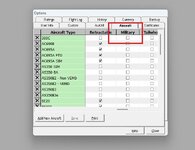
I refined my question a little. Under Option / Aircraft it list several items that can be set for the aircraft you create. I can't find a way to remove/alter the "Military" designation to a useful selection for me, so that the time entered for that aircraft is reflected when searching for the total times between aircraft that meet that entered designation. The Military designation doesn't show up on the log book itself but does show associated time when running reports for Aircraft totals.
This site uses cookies to help personalise content, tailor your experience and to keep you logged in if you register.
By continuing to use this site, you are consenting to our use of cookies.