• Initial testing of Apple's iOS 27 release shows no issues with Logbook Pro or APDL. Follow this BLOG article for updates should anyone report issues.

Resolved Calendar

Redbaron64

Well-known member
APDL Beta Team
Joined
Sep 3, 2013
Messages
1,140
Location
Arizona
Hello..
I have resync'ed all calendar events multipole times, but its not deleting the events that no longer exist.. when I make a change, I do see it updating immediately.. Thoughts?

1749829531620.jpeg

1749829564199.jpeg
 
Hi Neil.. is Calendar sync working ok.. I am not getting APDL to sync to Google Calendar.. tried resync all events.. nothing currently, its been probably 15 minutes etc..
 
I am having trouble syncing now too. How do I trigger a calendar sync, without deleting and resyncing everything again?

We just changed over to a new iPad for our EFB (iPad Pro M4), using iOS 26.1. I am also using APDL 14.9.2.20. I have the settings in APDL set to sync, and use the preferred Google calendar. I added another duty period tomorrow, and the individual flights are not showing up in any calendar anywhere in my iPad? What else can I check?
 
First, make sure the iPad is setup and signed in to Google as we just pass off the events to iOS and iOS handles sending it to your calendar as set.

Go to Settings > Calendar in APDL and change the target, then set it back to the desired target and see if that works. Create a new duty period, flight, etc. and see if it syncs.

You can also check another device using the same Google calendar and see if the events do appear there but not on your iPad as that may indicate a config issue in the iPads calendars area (accounts, etc.).
 
Still not working.

I made I test event on my Android phone in Google Cal, and it synced to my iPad in both the Google calendar app and the Apple calendar. I changed calendars for that event, and it changed everywhere. Still can't get my flights today to show up, and the flights from a couple of weeks ago have never updated in the calendar anywhere after actually flying them. I selected to resync all future events, no change. Past 30 days of events, no change.

I know I am signed into Google on my EFB, since Google calendar and Gmail all work fine. APDL has Full Access to calendar in iPad settings. The calendars appear to be working fine on me EFB. APDL does not appear to be talking to any calendar though. Conflict in iOS 26? Conflict in APDL beta 14.9.2.20? I hate to revert back to the previous version of APDL, just to see if the beta is the problem.

 
Last edited:
It's the beta version! I reverted back to the app store version, and did a sync for the previous 30 days, and my flights today showed up, and the last trip's flights updated correctly in my calendars everywhere. I will stay in the app store version until this gets fixed.
 
Bug report sent from within.
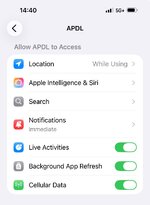
It seems that with the TestFlight version,
“Settings > APDL > Calendar” does not exist
 

Attachments

  • IMG_4766.jpeg
    IMG_4766.jpeg
    102.3 KB · Views: 76
Back
Top