• APDL 15.5 is now available on the Apple App Store. Click here to read the release announcement. Click here to go to the Apple App Store to install now.

SCR

Redbaron64

Well-known member
APDL Beta Team
Joined
Sep 3, 2013
Messages
1,140
Location
Arizona
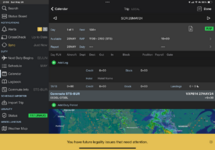
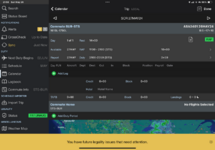
Does this look like its setup correctly.. first day shows no duty period, but day 2 and 3 (same numbers) are showing a duty period after 2100 TO 23:59 FOR 2:59 minutes.. Should be no duty after 2100 since the SCR is only 11:00 to 21:00, yes?..
 

Attachments
  • IMG_2276.png
    IMG_2276.png
    213.9 KB · Views: 111
  • IMG_2275.png
    IMG_2275.png
    247.7 KB · Views: 110
Last edited:
There should be no DUTY with a SCR assignment that you are not used for.

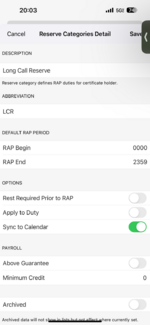
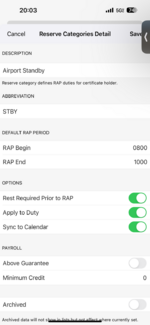
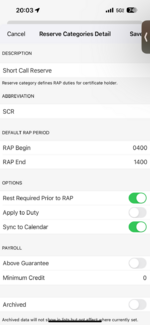
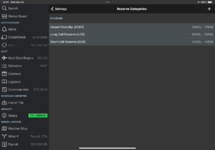
Go to MENU SETTINGS RESERVE CATEGORIES
You need to create a Category for each SCR RAP WINDOW
Make sure APPLY TO DUTY is unchecked
 
Thanks I’ll let you know when I get back to the room. I’m out walking right now beautiful out here in Santa Rosa, California.
 
This is what’s on my iPhone. I’ll check my iPad when I get to the room. .. ok.. iPad is the same..
 

Attachments

  • IMG_1592.png
    IMG_1592.png
    228.2 KB · Views: 102
  • IMG_1591.png
    IMG_1591.png
    231.8 KB · Views: 104
  • IMG_1590.png
    IMG_1590.png
    232.3 KB · Views: 111
  • IMG_2277.png
    IMG_2277.png
    98.8 KB · Views: 102
Last edited:
Hmm. still shows a report for duty line 2100-2359.. my Available line is 1100 - 2100.. are those backwards, or should the duty line be blank?..

ok.. I deleted the 5 days of SCR, Synced, and reloaded each day.. all 5 days ..look good with no duty time shown..
 
Last edited:
Back
Top