• Initial testing of Apple's iOS 27 release shows no issues with Logbook Pro or APDL. Follow this BLOG article for updates should anyone report issues.

Logged Schedule Importer time zones?

ifly737

Well-known member
Joined
Aug 31, 2009
Messages
259
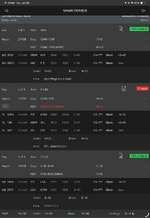
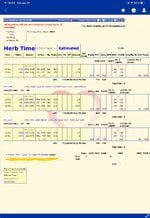
I have me settings in APDL set to import and display in Central Time. For some reason, 1 trip at the end of February of shifting the times by the time zone, when it was imported all in Central Time? I am using the App Store version.
 

Attachments

  • IMG_0045.png
    IMG_0045.png
    90.6 KB · Views: 75
  • IMG_0044.png
    IMG_0044.png
    150.4 KB · Views: 69
  • IMG_0046.jpeg
    IMG_0046.jpeg
    215.2 KB · Views: 68
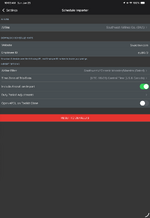
@ifly737 I looked at our schedule importer logs. Can you verify the app is using the desired time zone setting in Settings > Schedule Importer? I show your attempt from the app is using LOCAL yet you used CST on APDL.net.
 
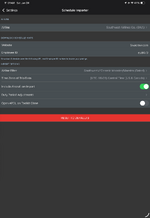
It has always been set to CST. Granted, I uninstalled the beta and installed the App Store version, so something may have gotten messed up there? I sent screenshot of the settings in the OP, but here is what they are right now…
 

Attachments

  • IMG_0048.png
    IMG_0048.png
    90.9 KB · Views: 60
My apologies as we have one other report of this so I didn't scroll up on this thread. If you could please try the BETA again. Delete the trip, sync from the menu, then go to Settings > Schedule Importer and verify the settings which should not change between app store and beta and test another import for me please so we can see if we're not passing the time zone properly when it's not local or UTC.

Verify FILTER, TIMEZONE and try again. Both of these were different between app test and APDL.net import.
 
My apologies as we have one other report of this so I didn't scroll up on this thread. If you could please try the BETA again. Delete the trip, sync from the menu, then go to Settings > Schedule Importer and verify the settings which should not change between app store and beta and test another import for me please so we can see if we're not passing the time zone properly when it's not local or UTC.

Verify FILTER, TIMEZONE and try again. Both of these were different between app test and APDL.net import.
That other report may have been me too. I was having problems with the Testflight version syncing with my calendar. I searched the forum for the issue and added it to another thread that was similar. Later I realized that thread was already marked "Resolved" so I started this thread.

Along those lines, the Testflight version was not syncing with my calendar. Did that get fixed? I don't want to trade 1 problem for another. I will try and install the Testflight version tonight and play with it, if I have enough time to revert back to the App Store version of it doesn't behave...
 
I installed the Testflight version, deleted a trip, and then downloaded it again from the Schedule Importer. It appears that it imported all of the times for the flights as expected (all in CST).

It does not appear that it is yet syncing any changes to flights as they happen though. I will plan to revert back to the App Store version tomorrow when I finish, for that reason. I believe that the Schedule Importer may correctly import flights with regards to chosen time zones though.
 
It does not appear that it is yet syncing any changes to flights as they happen though.
If you're referring to Calendar Sync, yes, it's broke in the beta. We're testing the fix now.
 
Back
Top